Pawlo
PawloHow to Sync Pet Care With Your Partner (+ the 5 Best Apps for It)
Stop double-feeding the dog. A 3-step method for sharing pet care with a partner, plus an honest comparison of the best shared pet care apps in 2026 — including one that's completely free.

“Did you feed her?” is the most-sent text in any household with a pet and two people. Not because anyone is careless — because feeding a dog takes thirty seconds and leaves no trace. Sharing a pet with your partner is wonderful; sharing the memory of what's been done is the part nobody warns you about.
This guide is in two parts. First, a three-step method for syncing pet care with your partner that works whether you use an app, a fridge chart, or a shared note. Then an honest look at the five best shared pet care apps in 2026 — with the facts taken from each app's own App Store listing, so you can check them yourself.
Pawlo is the free shared pet care app for couples — one checklist on both phones, every task stamped with who did it. →
How to sync pet care with your partner: the 3-step method
1. Write the routine down once — every task, with a time
Most couples never do this. The routine lives in one person's head, which is why that person feels like they do everything. Sit down together for ten minutes and list every recurring task: breakfast, dinner, morning walk, evening walk, litter, the monthly flea treatment, the twice-daily pill. Give each one a time window. This list is the contract; everything else is bookkeeping.
2. Make “done” visible to both of you — with a name on it
The double breakfast happens because “done” is invisible. Whatever system you pick, it needs two properties: your partner can see that a task was completed without asking you, and they can see who did it. A group chat has neither — “fed Max!” scrolls away by noon. A fridge chart has both if everyone initials it. A shared pet care app does it automatically the moment someone taps the task.
3. Review the week, not the moment
“I always do everything” is unwinnable in the moment because it's feeling versus feeling. With a record, it becomes a five-minute Sunday conversation: here's who did what this week; let's rebalance. Couples who do this stop having the argument — not because one of them was right, but because the data ends it.
If you want the paper version of step two, we made a printable “who fed the dog?” fridge chart. If you'd rather your phones did the work, keep reading.
What to look for in a shared pet care app
- Real-time sync: a check-off should appear on your partner's phone instantly — not after a refresh.
- Attribution: you need to see who completed a task and when, not just that it's done.
- Medication safety: a warning before a second dose is the feature you'll be gladdest you had.
- No member cap: a dog walker, a parent, or a sitter should be able to join for a week without a fuss.
- Multi-pet support: even if you have one pet today.
- Honest pricing: free, or at least every feature usable before you're asked to pay.
- Runs on both your phones: check the minimum iOS version — one app on this list needs a very recent iPhone.
The 5 best shared pet care apps in 2026
| App | Best for | Who did it & when | Double-dose warning | Price | Min. iOS |
|---|---|---|---|---|---|
| Pawlo | Couples, families, roommates sharing the whole routine | Every task | Yes | Free, nothing locked | 17 |
| Team Pet | Families who want to assign tasks to people | Not listed | Not listed | Free to download | 13 |
| Who Fed the Dog? | Lightweight tracking on older iPhones | Listed generally | Not listed | Free to download | 15.1 |
| Did I Feed the Dog? | Feeding only, fewest taps | Not listed | Not listed | Free (1 dog); $0.99 one-time Pro | 26.4 |
| DogLog | Dog-only homes wanting training & health tracking | Not listed | Not listed | Free + premium tier | 13 |
1. Pawlo — best overall for couples and households
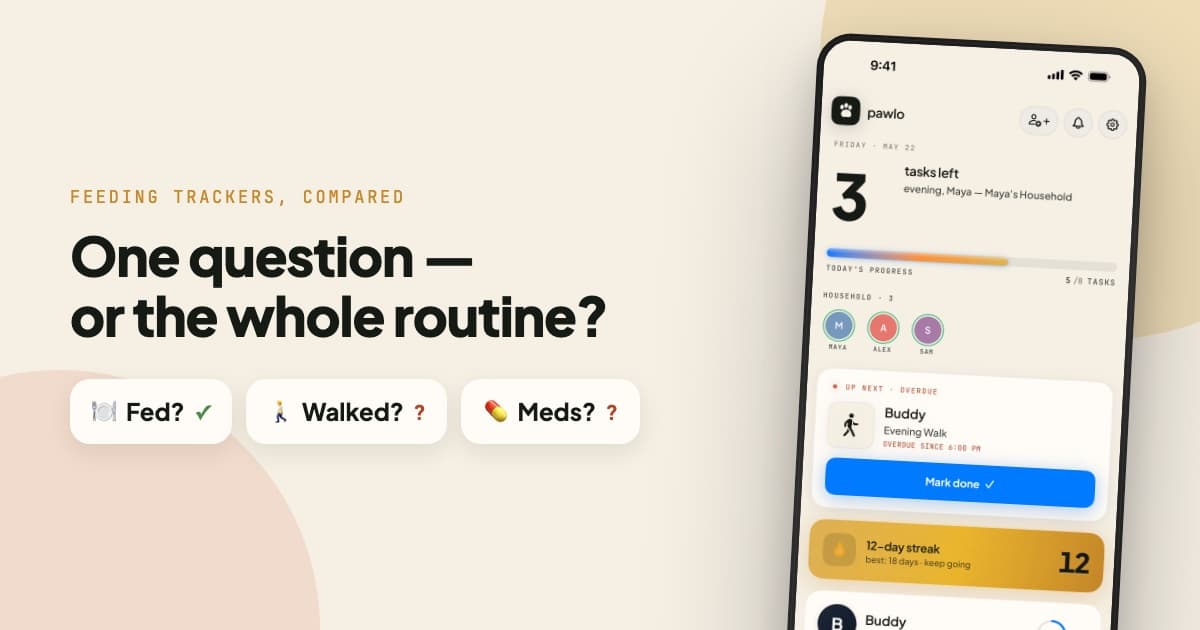
Pawlo was built for exactly this problem: one live checklist for feeds, walks, and meds, synced in real time to everyone who looks after the pet. When your partner marks breakfast done, you see it instantly — with who did it and when (“Fed by Sarah, 6:28 AM”). Because meds are critical, it warns before anyone accidentally double-doses.
The household streak is the part couples don't expect to care about and then do: complete every task and the streak grows; your partner will not let a 21-day streak die over a forgotten evening walk. Home screen widgets show progress, next task, and streak without opening the app, and the care history lets you look back at any day, per pet and per person — which is what makes step three of the method a two-minute conversation.
Price: free — no trial, no subscription, no locked features; unlimited pets and unlimited household members.
Platform: iPhone, iOS 17 or later. Android waitlist.
Best for: any household sharing more than one kind of task. See it for couples, families, or roommates.
2. Team Pet — best if you want to assign tasks to a person
Team Pet calls itself “shared pet care made simple,” and of the alternatives it's the closest in intent. Its listing highlights sharing and assigning tasks — feeding, walks, grooming, medicine, vet visits — with reminders, plus health and activity tracking for dogs, cats and more. If your household runs on “this is your chore,” assignment is the feature you want. A name and time on completed tasks and a double-dose warning aren't listed.
Price: free to download. Platform: iOS 13+. Full Pawlo vs Team Pet comparison.
3. Who Fed the Dog? — best lightweight tracker for older iPhones
Broader than its name: the listing says it tracks feeding, medication, walks, water and daily pet care for families, pet sitters and dog walkers, so a pet is never double-fed or missed. It supports iPhones back to iOS 15.1, which matters if one of you is holding onto an older phone. Streaks, widgets and per-person history aren't listed.
Price: free to download. Platform: iOS 15.1+. Full Pawlo vs Who Fed the Dog? comparison.
4. Did I Feed the Dog? — best single-purpose feeding board
A genuinely clever piece of minimalism: open the app, see who needs a meal, log it with one tap, even half-awake. It's free for one dog with a one-time $0.99 Pro unlock for unlimited dogs — no subscription. The trade-off is scope (feeding only) and a surprisingly high floor: the listing requires iOS 26.4 or later.
Price: free (1 dog); $0.99 one-time Pro. Platform: iOS 26.4+. Full Pawlo vs Did I Feed the Dog? comparison.
5. DogLog — best for dog-only homes that want training and health tracking
The most established app here: its listing cites 100,000+ owners, and it holds a 4.8-star rating from more than 1,300 reviews. DogLog tracks health and coordinates daily tasks for single owners and families, with puppy training and potty-schedule tracking called out specifically. It's dog-focused by name and design, and offers a premium tier in-app.
Price: free to download; premium tier in-app. Platform: iOS 13+. Full Pawlo vs DogLog comparison.
If you're a couple
Two people, one pet, two work schedules. The failure mode is the double breakfast and the “I do everything” fight. You want attribution more than assignment — nobody needs a chore chart for two — and you want it to keep working when one of you is travelling. Pawlo fits this best; Who Fed the Dog? is the lighter option. More on the pet care app for couples page.
If you're a family
Kids promised to feed the dog; parents want to verify without nagging. Assignment matters more here (Team Pet's strength), but so does a record parents can trust — a name-stamped check-off is what turns “did you do it?” into something kids want to mark done themselves. Pawlo's family setup is on the family pet care app page.
If you're roommates
Three people, three schedules, zero shared memory, and a freeloader problem nobody can prove. The receipt on every task is the whole point; so is a history you can check when “I always walk her” needs a fact-check. See the pet care app for roommates page.
What we left out, and why
Health-record apps (11pets, Petable, Pet Diary and similar) are excellent at storing vaccination records, vet visits and expenses, and poor at the daily “was he fed?” question — they're for one person's records, not two people's coordination. Generic task apps (Reminders, Todoist, Notion) can be bent into shape but don't know who did what or that a second dose is dangerous. The group chat is what most couples default to, and it's the worst option on the list: no history, no attribution, and the dog gets two breakfasts. You've been there.
The verdict
Do the three steps first — they work with any system. Then, if you want the system to do step two for you: Pawlo for households sharing the whole routine (free, with a name on every task and a warning before a second dose), Team Pet if you'd rather assign chores, Who Fed the Dog? or Did I Feed the Dog? if you want something minimal, and DogLog if your household is dog-only and wants training and health tracking too.
Related pet care guides
Frequently asked questions
How do couples sync pet care?
Write the routine down once with a time for each task, make every completed task visible to both of you with a name on it, and review the week rather than arguing about the moment. A shared pet care app does the middle step automatically; a fridge chart works if you're disciplined about initials.
What is the best pet care app for couples?
For couples who share daily feeding, walks and meds, Pawlo is built around a shared checklist with a name and time on every task, double-dose protection, streaks and widgets — and it's free. Team Pet, Who Fed the Dog? and Did I Feed the Dog? are lighter alternatives; DogLog is strongest for dog-only households that want training and health tracking.
Do we both need to pay for a shared pet care app?
With Pawlo, nobody pays — it's free with no trial, no subscription and no locked features. Some other apps offer a one-time unlock or a premium tier; check each App Store listing.
Can a dog walker or family member join too?
Yes. Pawlo households can include partners, family, roommates and pet sitters — anyone you invite with a link sees the same live list.
Ready to stop wondering who fed the pet?
Pawlo is free — no subscription, nothing locked. Get your whole household in sync today.
Download on the App Store →